

Inertia Modifier
Adds a sense of physical weight to the camera by introducing directional drag during movement states like sprinting or falling.
Instead of snapping precisely to the player’s position every frame, the camera eases behind the player then smoothly catches up, creating a sense of momentum.
This modifier reacts automatically to gameplay events, blending between movement states as the character accelerates, sprints, stops, or drops. Designers can fine-tune exactly how much the camera “drags,” how quickly it recovers, and how far it is allowed to lag behind.
Responsibilities
- Adding axial drag to camera movement during sprinting and falling.
- Distinguishing between separate movement states (Default → Sprint → Fall) with configurable thresholds.
- Applying custom strength, recovery speed, and maximum lag distance per state.
- Blending smoothly between states using the global State Transition Speed.
- Supporting optional vertical inertia during falling, including its own multiplier.
- Ensuring the camera always returns to the player smoothly and predictably.
Inertia Settings
State Blending
- State Transition Speed
How quickly the camera blends between grounded and airborne inertia profiles.
Higher values make transitions more immediate.
Axis Weighting & Sensitivity
- Axial Factors (All States)
Independent X and Y weighting values determine how responsive inertia is per movement axis.
X = Forward / Backward drag
Y = Lateral drag - Vertical Multiplier (Airborne Only)
Only applies when vertical inertia is enabled and shapes the downward/upward drag strength.
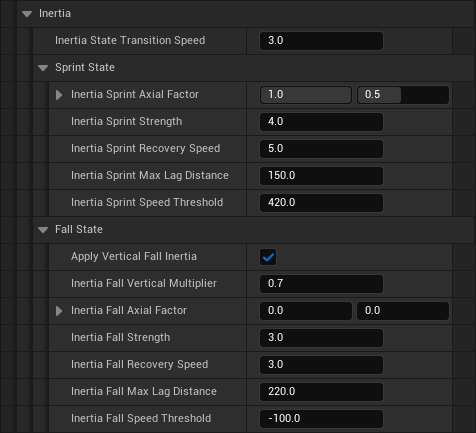
Ground Movement Response
- Sprint Strength
How pronounced the drag effect is during fast ground movement. - Sprint Recovery Speed
How quickly the camera realigns with the player after sprint drag fades. - Sprint Max Lag Distance
Maximum distance the camera is allowed to drift behind the player during sprinting. - Sprint Speed Threshold
Minimum horizontal speed required before ground-based inertia activates.
Airborne Movement Response
- Apply Vertical Fall Inertia
Enables vertical (Z-axis) drag while airborne. - Fall Strength
Drag strength applied while falling. - Fall Recovery Speed
How quickly the camera catches up after fall drag fades. - Fall Max Lag Distance
Maximum allowable drift behind the player while airborne. - Fall Speed Threshold
Minimum vertical speed required to enter airborne inertia.
Quick Notes
- The Inertia Modifier should not be used in parallel to regular Camera Lag settings as this causes double filtering behavior. (jitter)
- Sprint and Fall states behave independently but share the same conceptual structure.
- AxialFactor lets you reduce unwanted lateral sway without affecting forward motion response.
- Use RecoverySpeed to prevent the camera from feeling “floaty” when inertia fades out.
- The thresholds prevent accidental activation during small hops or minor movement spikes.
- Vertical inertia is optional; disable it for tighter platforming or competitive movement.
- Max lag distances prevent excessive drift during heavy movement changes.
- Use Get Inertia Modifier from the Camera Manager Component to access modifier data.
- © 2025 Gameverse Entertainment. All rights reserved.