

Obstacle Avoidance Modifier
Prevents the camera from clipping through geometry by pulling it toward a safe position.
Instead of reacting only when a hit occurs, it samples multiple traces around the desired camera position, evaluates available space, and moves the camera to the nearest valid location. When an obstruction clears, the camera blends back to its intended distance.
It uses a center trace supported by optional side traces, giving it enough spatial awareness to slide around tight corners, adjust for uneven walls, and prevent sudden pops. All adjustments are distance-based, interpolation-driven, and happen without interrupting player input.
Responsibilities
- Maintain a clear, unobstructed path between player and camera.
- Sample world geometry using a central trace and optional offset traces.
- Determine the closest available camera distance that avoids collision.
- Interpolate smoothly into and out of adjusted distances.
- Respect user input and never override manual zoom changes.
- Support debugging through optional visual trace rendering.
Obstacle Avoidance Settings
Initial Viewpoint Position
- Camera Start Distance
Defines how far along the camera’s arm the view begins at startup.
0 → starts at the player and interpolates outward
1 → starts at the intended camera position immediately
Used only during initialization.
Probe & Trace Controls
- Probe Size
Size of the sphere used for all avoidance traces. Larger values help catch small details but increase the chance of early obstruction. - Num Traces
Number of additional traces around the main trace. These are arranged in a ring pattern at a fixed offset.
Does not include the center trace. - Trace Offset
Distance from the central trace where additional traces are placed.
Helps detect narrow openings or angled surfaces. - Ignore Tag
Actors with this tag are skipped by the modifier.
Useful for invisible blockers, foliage, or scripted objects meant to be ignored.
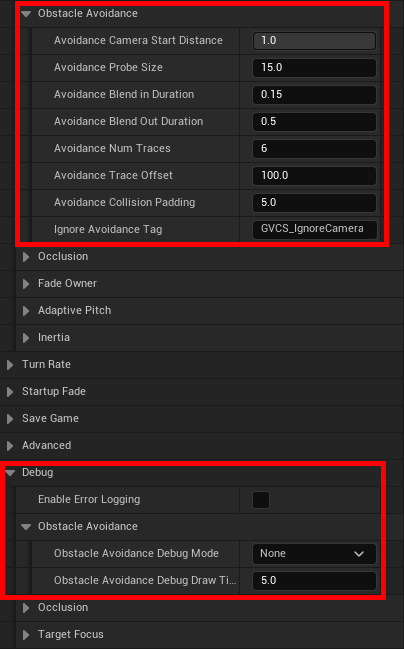
Collision Response
- Collision Padding
Adds an extra offset to ensure the camera does not rest directly against geometry once a hit is found.
Blend Timing
- Blend In Duration
Controls how fast the camera adjusts toward a closer, unobstructed position. - Blend Out Duration
Controls how fast the camera returns back to full distance after the obstruction is gone.
Debugging
- Debug Mode
Draws debug traces showing how the modifier samples the scene.
Supports Unreal’s standard trace debug options. - Debug Draw Time
Duration traces remain visible when Debug Mode is set to For Duration.
Quick Notes
- Ensure objects that should collide with the Camera has the trace channel response for Camera set to block.
- Supports mid-frame updates when zooming, sprinting, or entering confined spaces.
- Always prioritizes the player’s zoom input over automatic distance changes.
- Side traces help prevent sliding into walls when navigating angled corners.
- The modifier automatically handles the players spring arm “Do Collision Test” setting when toggled.
- If the modifier is disabled, use the “Immediate” flag to decide whether distance resets instantly or blends back out.
- Access the modifier through “Get Obstacle Avoidance Modifier” if you need to query its current state or calculated distance.
- © 2025 Gameverse Entertainment. All rights reserved.