

Pitch Follow Modifier
The Pitch Follow Modifier adjusts the camera’s vertical rotation to track the player’s movement on slopes, jumps, and falls.
It reads the player’s vertical movement direction and applies controlled pitch adjustments to keep the character framed consistently.
When configured, it can also operate independently of movement input, providing a more persistent camera alignment style.
Pitch adjustments blend smoothly using interpolation and always defer to player look input when active.
Responsibilities
- Compare the player’s movement direction against current camera pitch.
- Apply vertical rotation when the two drift apart.
- Respect player look input and suspend adjustments while input is active.
- Follow movement input requirements when enabled.
- Smoothly interpolate pitch changes using separate grounded and airborne speeds.
- Prevent micro-adjustments through threshold controls.
- Avoiding “creeping” pitch adjustments when the offset is too small.
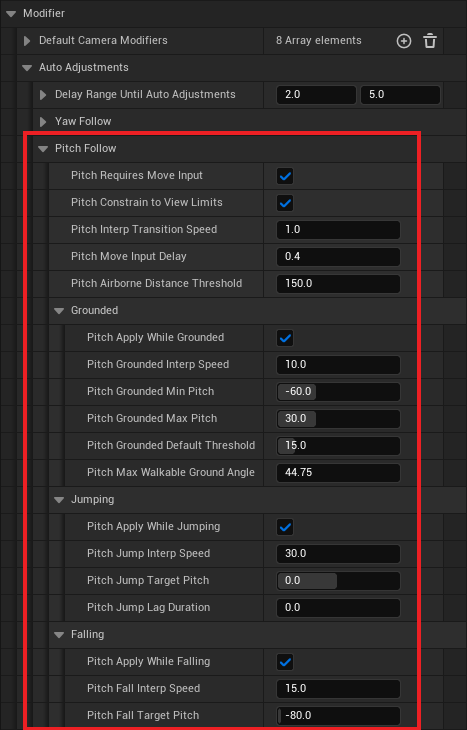
Pitch Follow Settings
Activation Rules
- Requires Move Input
If true, pitch adjustments only occur when the player is providing movement input. - Constrain To View Limits
Restricts automatic pitch adjustments from exceeding the player’s configured pitch limits. - Apply While Grounded
Allows pitch follow to continue while grounded. - Apply While Jumping
Allows pitch follow to continue while jumping. - Apply While Falling
Allows pitch follow to continue while falling.
Movement Requirements
- Move Input Delay
Delay applied after detecting movement input before pitch follow activates. - Airborne Distance Threshold
Minimum distance from the ground before Jump or Fall behavior activates. - Grounded Default Threshold
Minimum slope incline required before slope-based adjustments begin.
Applied to both positive and negative slope directions. - Max Walkable Ground Angle
Defines the slope angle range used for grounded adjustments.
For custom movement, match this to your pawn’s walkable floor angle. - Jump Lag Duration
Delay before the camera starts interpolating toward Jump Target Pitch.
Set to 0 to disable the lag entirely.
Interpolation Speeds
- Grounded Interp Speed
Interpolation speed used while grounded. - Jump Interp Speed
Interpolation speed used during jumping. - Fall Interp Speed
Interpolation speed used during falling. - Interp Transition Speed
Blends between grounded and airborne interpolation speeds.
Target Angles
- Grounded Min Pitch
Lowest pitch value reachable when moving down a slope equal to Max Walkable Ground Angle. - Grounded Max Pitch
Highest pitch value reachable when moving up a slope equal to Max Walkable Ground Angle. - Jump Target Pitch
Pitch angle the camera tries to reach during jumps. - Fall Target Pitch
Target pitch angle applied during falling.
Quick Notes
- Player look input pauses pitch follow until input stops.
- Threshold and minimum delta values prevent unwanted micro-corrections.
- Move-input-required mode offers a more passive feel; persistent mode keeps framing tighter.
- Jump and Fall behaviors can be enabled independently, Enabling Jump does not require enabling Fall, and vice versa.
- Character-based actors usually don’t need to configure slope angle, Max Walkable Ground Angle defaults to the ACharacter CMC value.
- Use “Get Pitch Follow Modifier” from the Camera Manager Component if you have to access data from this modifier.
- © 2025 Gameverse Entertainment. All rights reserved.