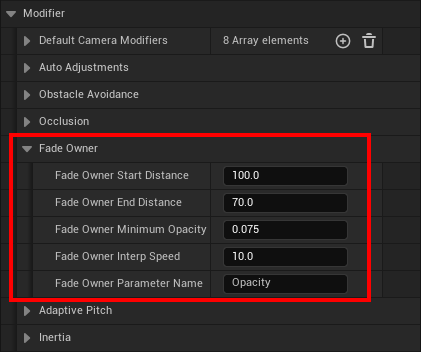
Reduces the opacity of the player when the camera moves too close. It keeps the view clear in tight spaces by fading the player mesh as the distance between camera and pawn approaches a defined threshold, then restoring opacity as the camera pulls back.
The modifier works entirely through a named material parameter, creating dynamic material instances when needed and updating them every frame. Fade behavior is distance-driven, interpolation-controlled, and never interferes with visibility at normal gameplay distances.
Responsibilities
Detect when the camera is within a defined distance of the player pawn.
Fade the player toward a target opacity based on proximity.
Restore full opacity when the camera distance increases again.
Interpolate opacity smoothly for both fade-in and fade-out behavior.
Player Fade Settings
Owner Start Distance Distance at which fading begins. The player is fully opaque beyond this point.
Owner End Distance Distance at which the player reaches minimum opacity.
Owner Minimum Opacity Lowest opacity the player will fade to.
Owner Interp Speed Speed used to interpolate opacity changes.
Owner Parameter Name The scalar material parameter used to drive the fade effect.
Quick Notes
Ensure the player mesh material contains the matching scalar parameter name.
Fade behavior is distance-based and never overrides other transparency effects on the player.
The fade range can be compressed or expanded for different pawn sizes without changing any modifier logic.
A minimum opacity above zero preserves outline and readability in cramped environments.
Fade begins smoothly between Start and End distance.
Use “Get Player Fade Modifier” from the Camera Manager Component if you have to access data from this modifier.